TABLE OF CONTENTS
- Provider Invoicing Enhancements
- Enrollment Enhancements
- Family Application Enhancements
- DRDP-2015 Enhancements
- General Enhancements
- CAPSDAC 2.0 Report Enhancements
- Fixes & Adjustments
Provider Invoicing Enhancements
Many exciting updates are coming to the Provider Invoicing feature in this release, as described below:
- Provider Rates Setup - Certified Enrollment Hour Calculations
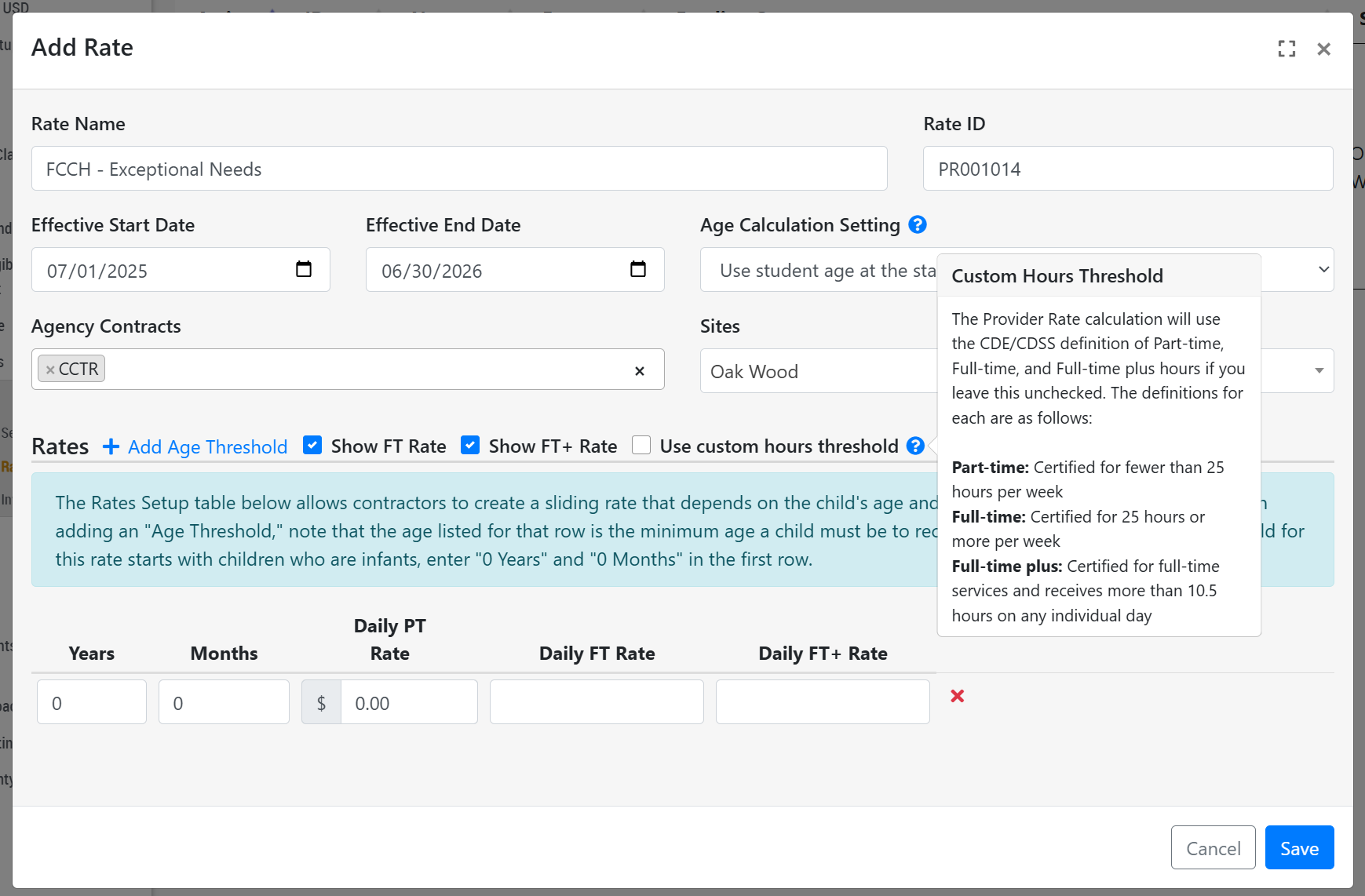
- We have made many improvements and updates to the Provider Rates/Invoicing feature in Hubbe to ensure that child invoice data is generated in accordance with CDE and CDSS guidelines on determining a child's rates. Before this update, users would enter the Daily Rate for PT, FT, and FT+ with Daily Hour Threshold amounts to qualify for each rate daily. Now, the system will look at a child's certified weekly hours to determine each day's rate, as is typical in CDE and CDSS certification.
- For example, if a child's certified weekly hours is below 25 hours then each day of that week will be considered PT; if a child's certified weekly hours is 25 hours or more then each day will be considered FT; and lastly, a child will only be charged the FT+ rate for individual days that are certified for 10.5 hours or more as long as that child is already certified as a FT student (certified for 25 hours or more per week).
- While these changes above will be the default configuration for any newly created Provider Rate, we have also added a setting to "Use custom hours thresholds" which will allow users to enter their own daily hour thresholds for each rate, which will operate the same as it did before.
- Any Provider Rate that has been created before this update will be migrated to select this new setting "Use custom hours thresholds," and all rate amounts and hour thresholds will be preserved - in other words, there will be no change to how the invoicing will operate for current users of this feature.
- To support the changes above, you will notice that the "Provider Rate" setup modal is a bit different. For example, the field titled "Should rate be calculated based on enrollment or attendance hours?" will now only appear if the "Use custom hours thresholds" is selected in the "Rates" section. This is because the Certified Enrollment hours will always be used now if the "Use custom hours thresholds" is not checked, and the default calculations are used. We hope these updates serve your team well!
- We have made many improvements and updates to the Provider Rates/Invoicing feature in Hubbe to ensure that child invoice data is generated in accordance with CDE and CDSS guidelines on determining a child's rates. Before this update, users would enter the Daily Rate for PT, FT, and FT+ with Daily Hour Threshold amounts to qualify for each rate daily. Now, the system will look at a child's certified weekly hours to determine each day's rate, as is typical in CDE and CDSS certification.
- Provider Invoicing by Child
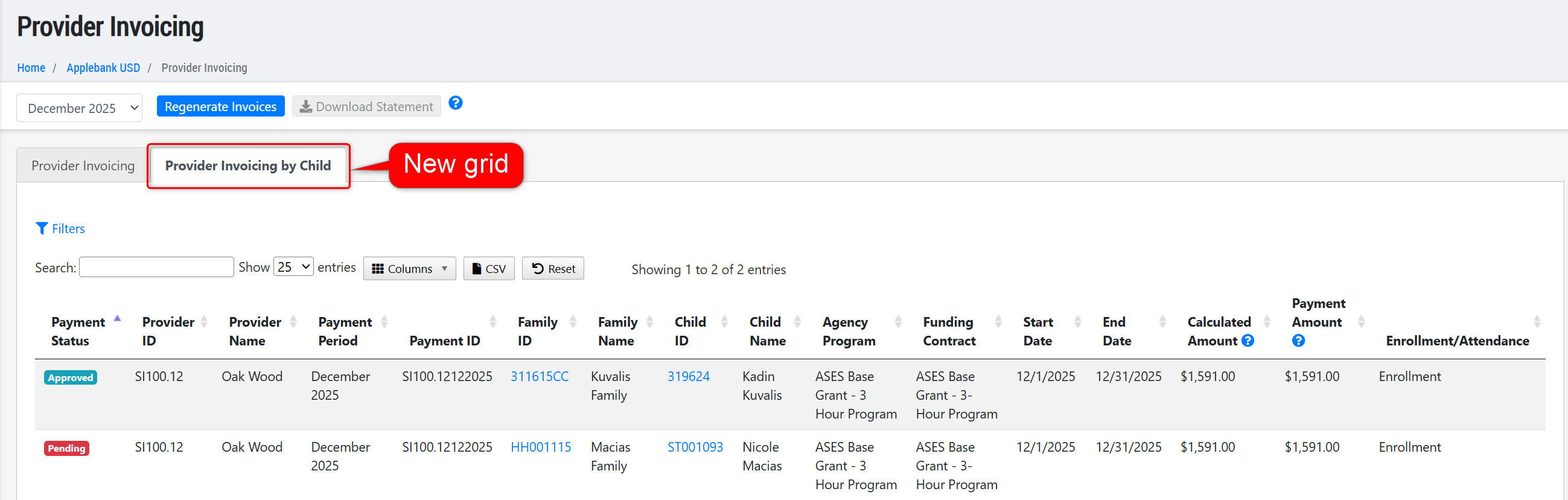
- Added a new tab to the Provider Invoicing record at the agency level titled "Provider Invoicing by Child." This new tab will list each child's invoice that has been generated for the selected invoicing period, with high level details for each invoice, including the Payment Status, Provider, Family, Child, schedule details, invoice amounts, and whether the invoice is based on the child's Enrollment or Attendance. There are many tools on this grid, including filters, column selection, column re-ordering, and a CSV download option. This grid will show all children across all providers with an invoice for the selected period, but users can still click into any Provider to view invoices for only the children served by that provider.
- General Enhancements
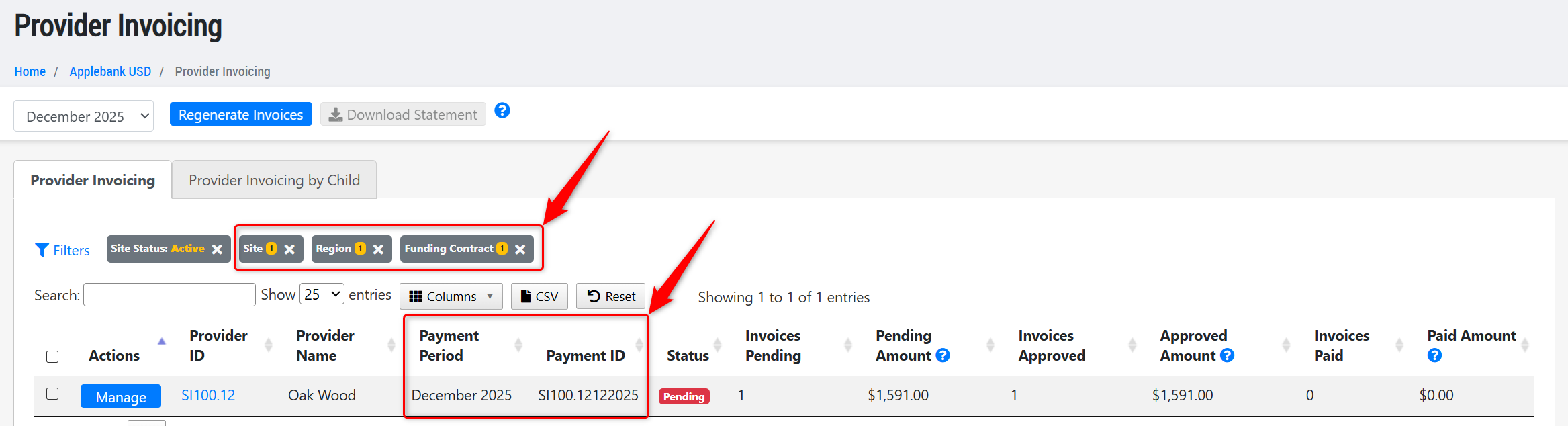
- We've added the following two columns to the original Provider Invoicing grid:
- Payment Period - This column will display the invoicing period selected in the top filter. We've added this column to provide context to the data in the CSV download.
- Payment ID - The Provider ID and invoicing period will be combined to generate unique IDs. For example, a provider with ID 1234 in the invoicing period of January 2026 will have a Payment ID of 1234012026.
- We've added three new filters to the original Provider Invoicing grid:
- Site - This filter will allow users to select from their list of providers.
- Region - This filter will allow users to select from their region list. Note that you can set up "Regions" from your Agency Setup > Preferences menu item. Once you add regions, you can select one on each site record.
- Funding Contract - This filter will allow users to select from a list of funding contracts, with inactive contracts at the bottom of the list. Any contract filter applied to the grid will filter the individual provider invoice amounts under the selected contracts - so if a filter called "CCTR" is applied, then only the invoice amounts from children served under the "CCTR" contract will show in the grid.
- We've added the following two columns to the original Provider Invoicing grid:
Enrollment Enhancements
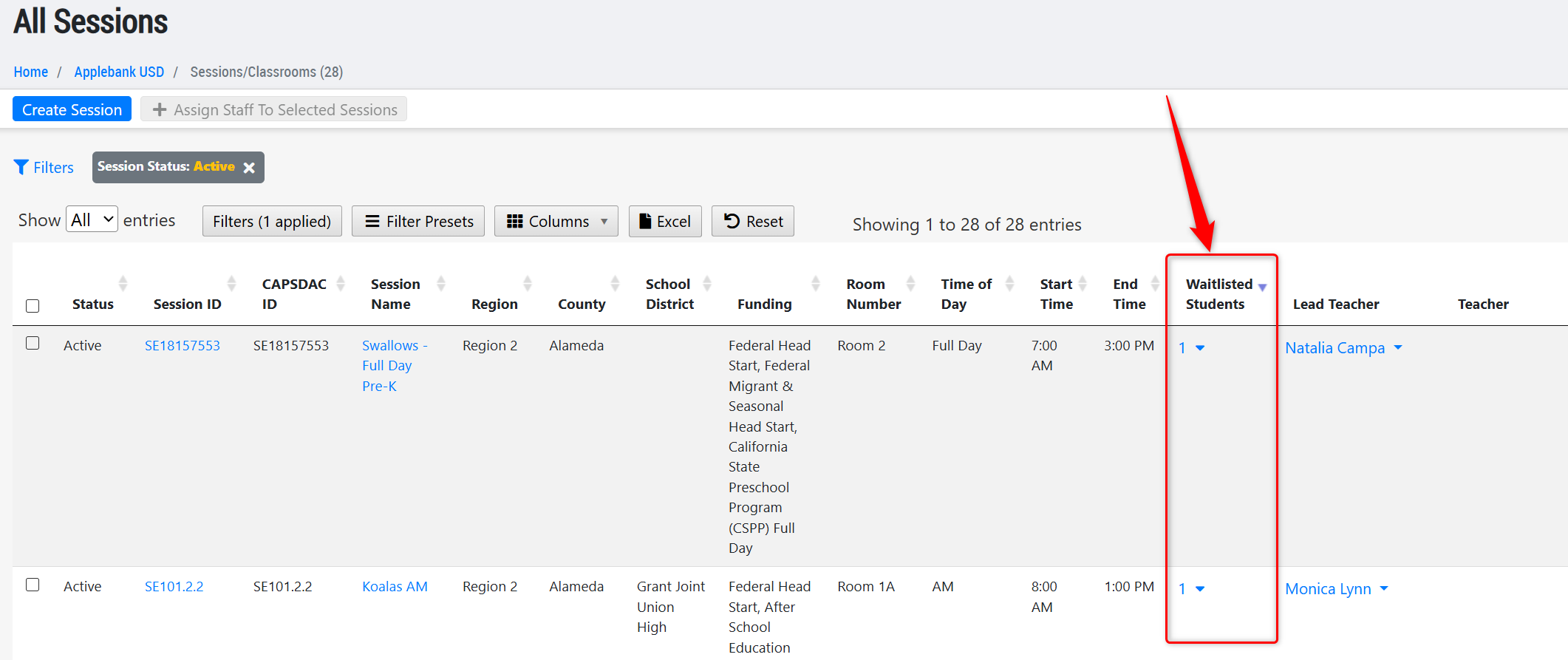
- Updated the "Waitlisted Students" column of the All Sessions grid to only include applications that have that session selected, so long as the application does not have a status that is Enrolled, Does Not Qualify, or Withdrawn - since those applications should no longer be counted towards your active waitlists for sessions. To navigate to this grid: Agency Menu > Sessions/Classrooms.
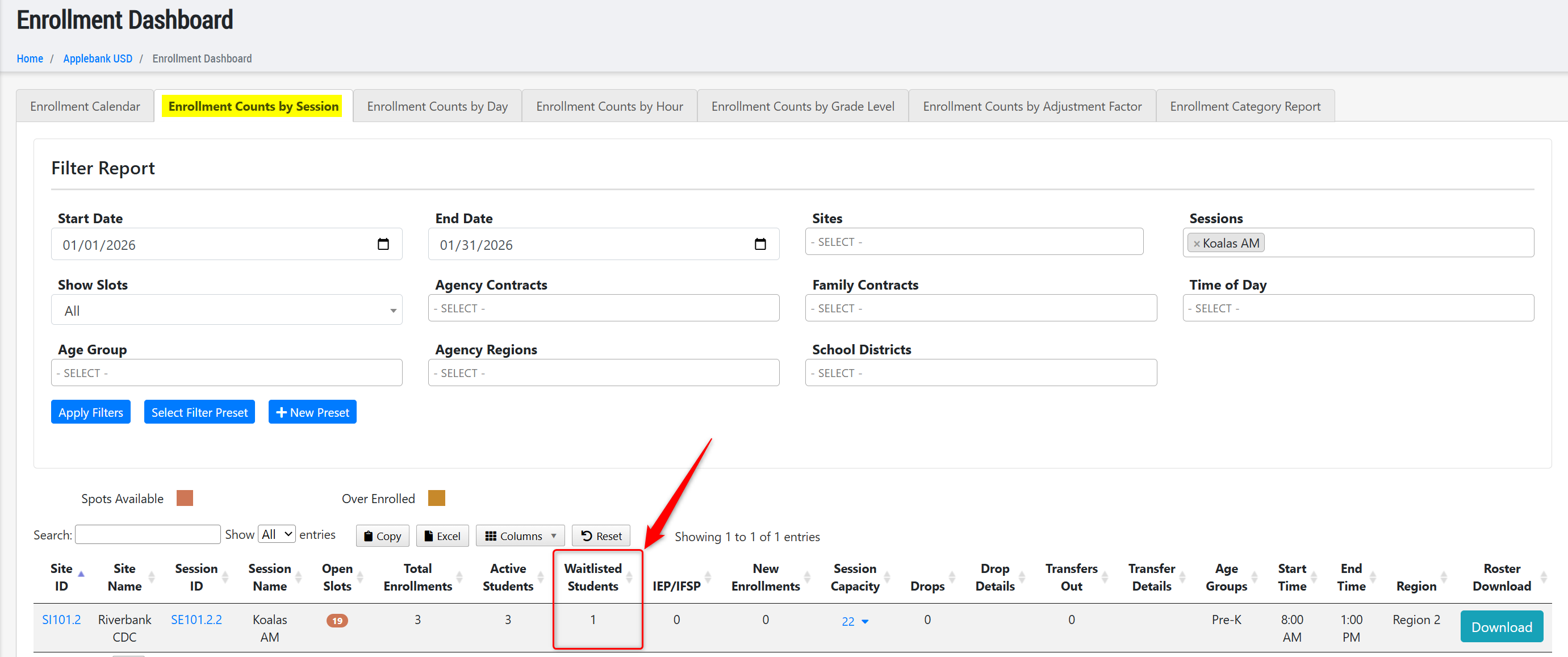
- Added a new column to the "Enrollment Counts by Session" grid in the Enrollment Dashboard titled "Waitlisted Students" that will operate the same as the one in the "All Sessions" grid described above. This column will show all current waitlist counts (regardless of the dates applied to the grid) for applications that have that session selected and that do not have a status of Enrolled, Does Not Qualify, or Withdrawn. To navigate to this grid: Agency Menu > Intake, Eligibility, and Enrollment > Enrollment Dashboard > Enrollment Counts by Session.
- Updated the "Enrollment Counts by Day" report within the Enrollment Dashboard to ensure any child who is dually funded is only reported once in the "Spots Filled" count for the session's enrollment numbers. For example, if a child has two schedules, one with a CSPP contract and one with a Head Start contract, they will now only be counted as 1 spot taken in the session.
- Updated the "Enrollment Category Report" within the Enrollment Dashboard to ensure a child's adjustment factor category determination only looks to the days the child is scheduled within the filtered date range. For example:
- Report Date Range: 10/01/2025 - 12/01/2025
- Child's Birth Date: 11/01/2022
- Child's Schedule Start/End Dates: 11/15/2025 - 6/30/2026
- Logic: This child will only appear with an adjustment factor category of Three-Year-Old, even though the child is also eligible for the Toddler category during the report's date range. This is because this is the only category the child is eligible for during their own scheduled date range, since they have already turned 3 years old by the time their schedule begins within the filtered date range.
Family Application Enhancements
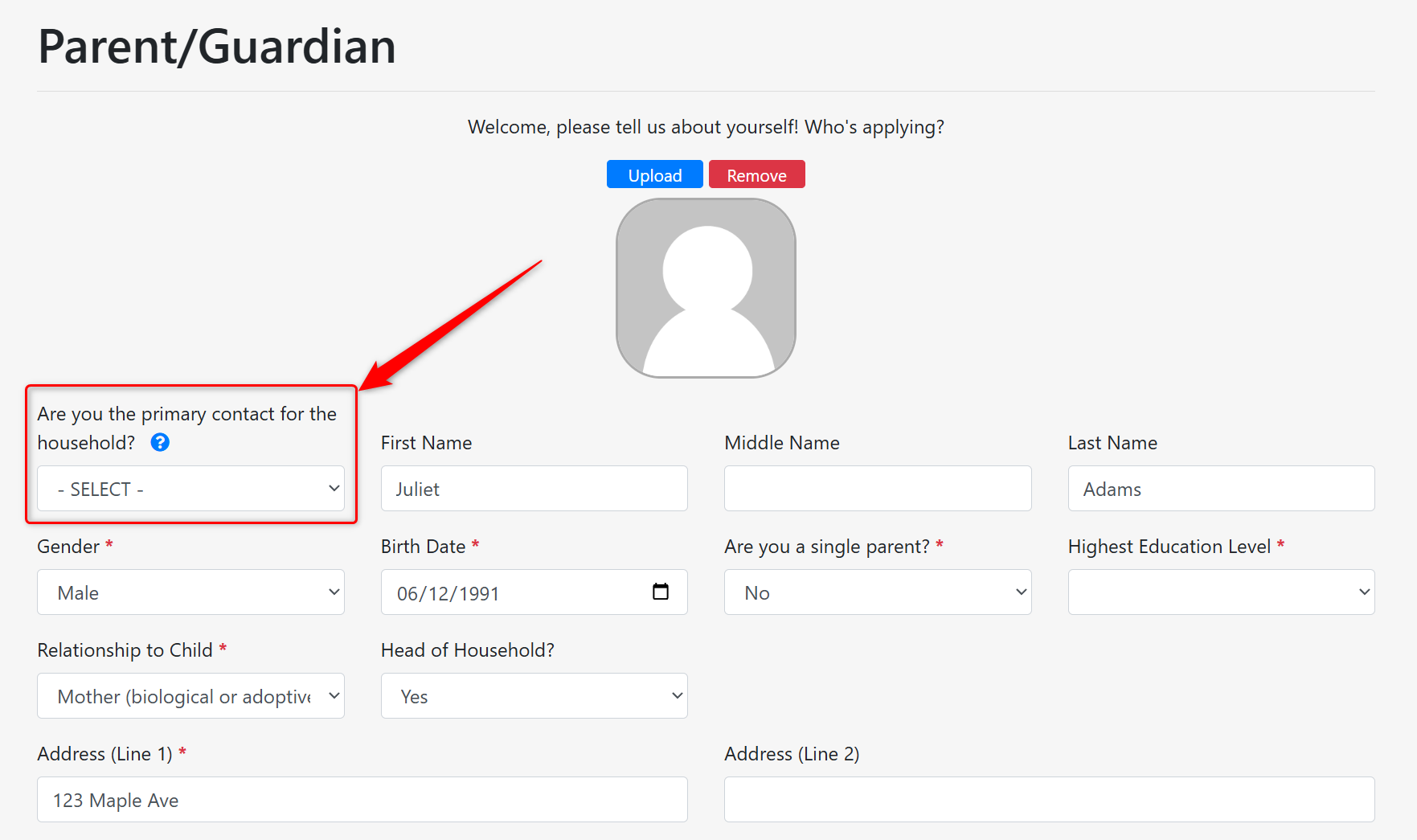
- Updated the field in the Parent record titled "Are you the primary contact for the household?" within the Family Application. Previously, this field defaulted to "No," and applying parents would need to change the applicable parent to "Yes" in order to submit their application. Now, this field will be blank by default. Users will be required to select "Yes" or "No" before saving & creating the parent record in the application. This field is an important piece of the application process, as it indicates which parent record should be assigned the Parent Portal account that is being used to apply for services upon intake of the application. With this update, the selection made by parents is more intentional and clear by requiring input rather than defaulting to "No" as it was before.
- Many exciting updates are coming to the Family Application to support Head Start Enrollment next month, so please look out for these enhancements in our release notes!
DRDP-2015 Enhancements
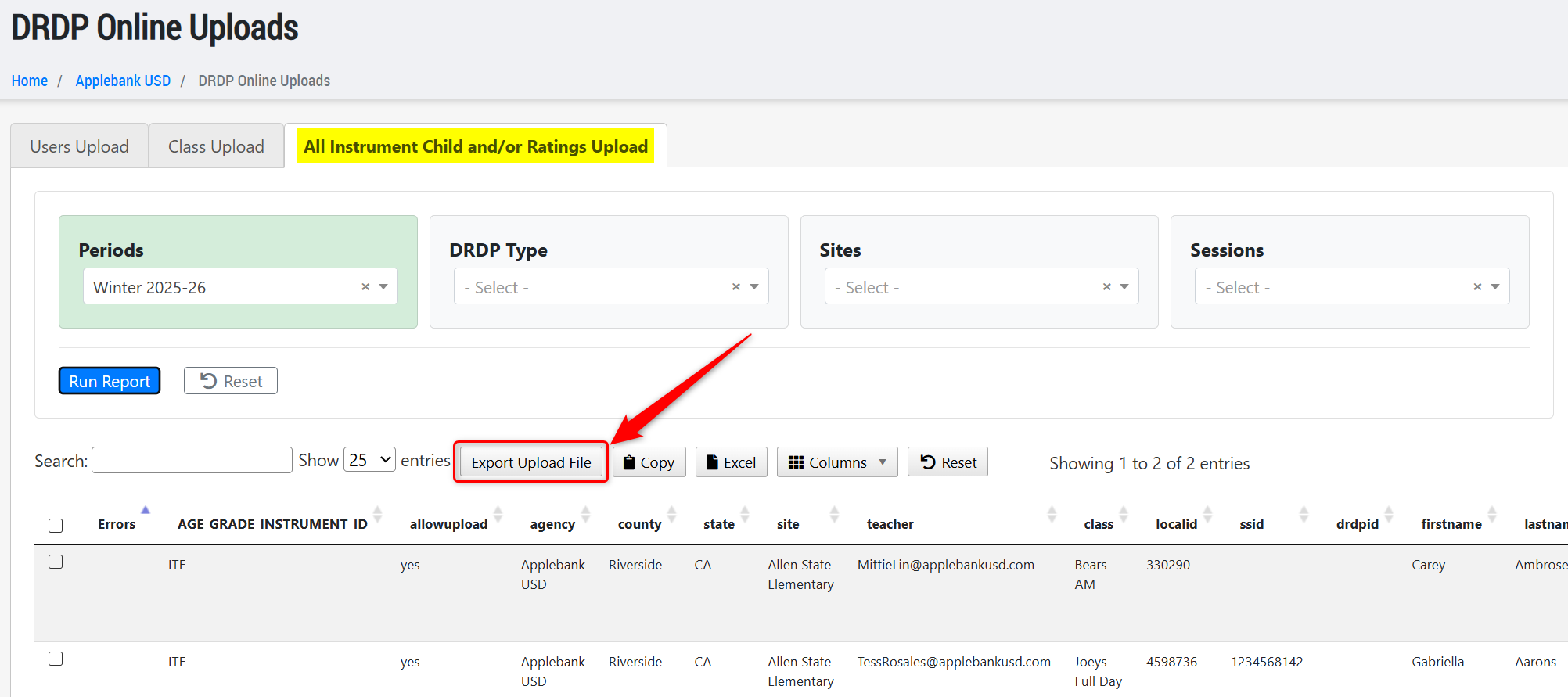
- Updated the Report File export on the DRDP Online grid's "All Instrument Child and/or Ratings Upload" tab to ensure it matches the updated file from the DRDP Online team. We have also updated the Race values to match the new mappings from the Race selections made in Hubbe. Finally, we have updated the Program Name column with the addition of a new "Other Program" column to ensure the values are properly automated.
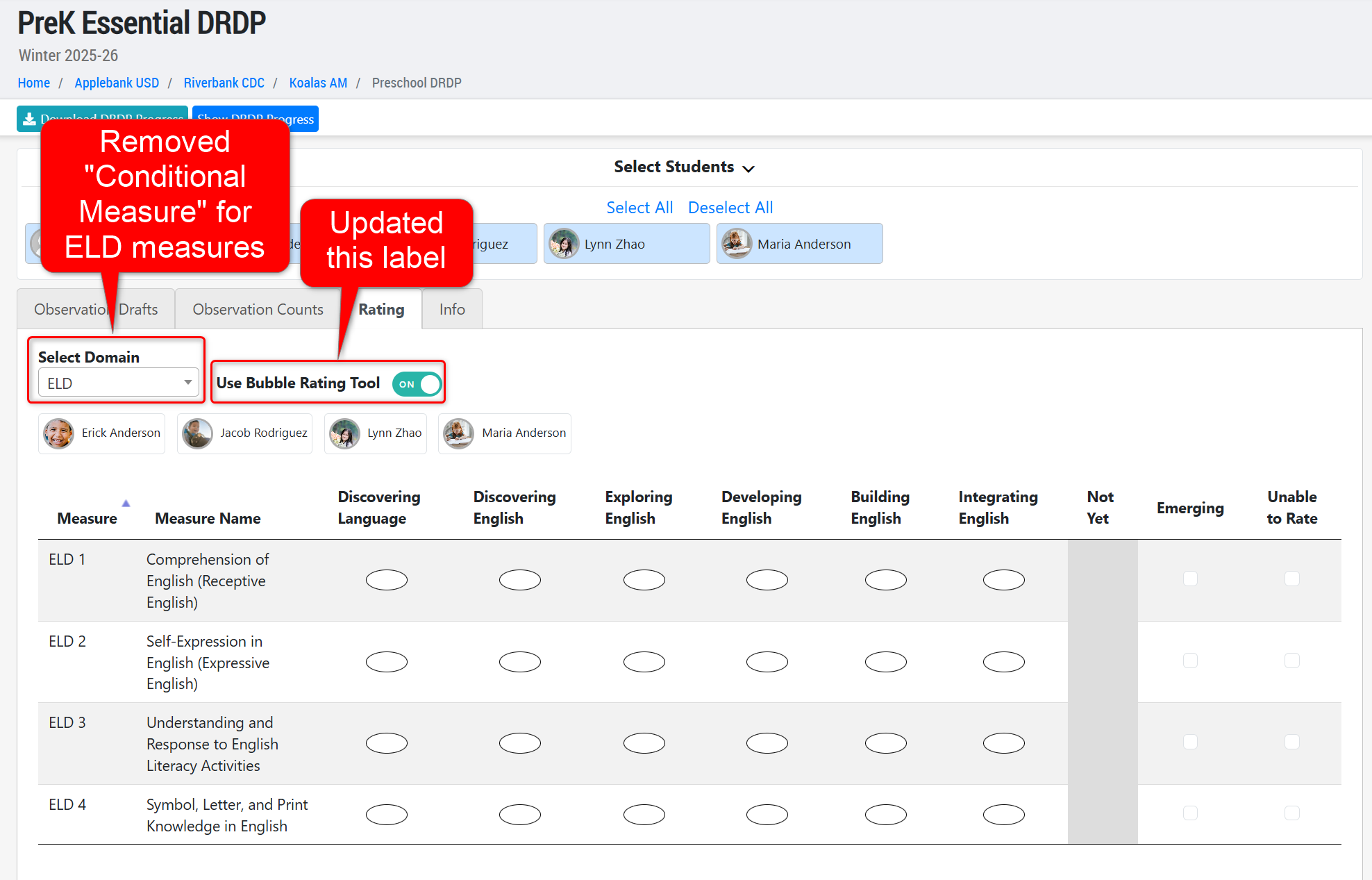
- On the DRDP Rating tool at the session level, we have updated the toggle in the "Rating" tab from "Use Scantron View For Rating" to now be called "Use Bubble Rating Tool," as requested by users who are more familiar with this term. The tool itself has not changed, but it is now titled to better describe the tool.
- To the PreK DRDP Assessment Level, we have removed the "Conditional Measure" rating option for all ELD measures, following reports from users during DRDP Online submission that this rating option was selected for ELD measures.
- Many additional updates are coming to the DRDP Rating tool at the session level for teachers next month, so please look out for these exciting enhancements in our release notes!
General Enhancements
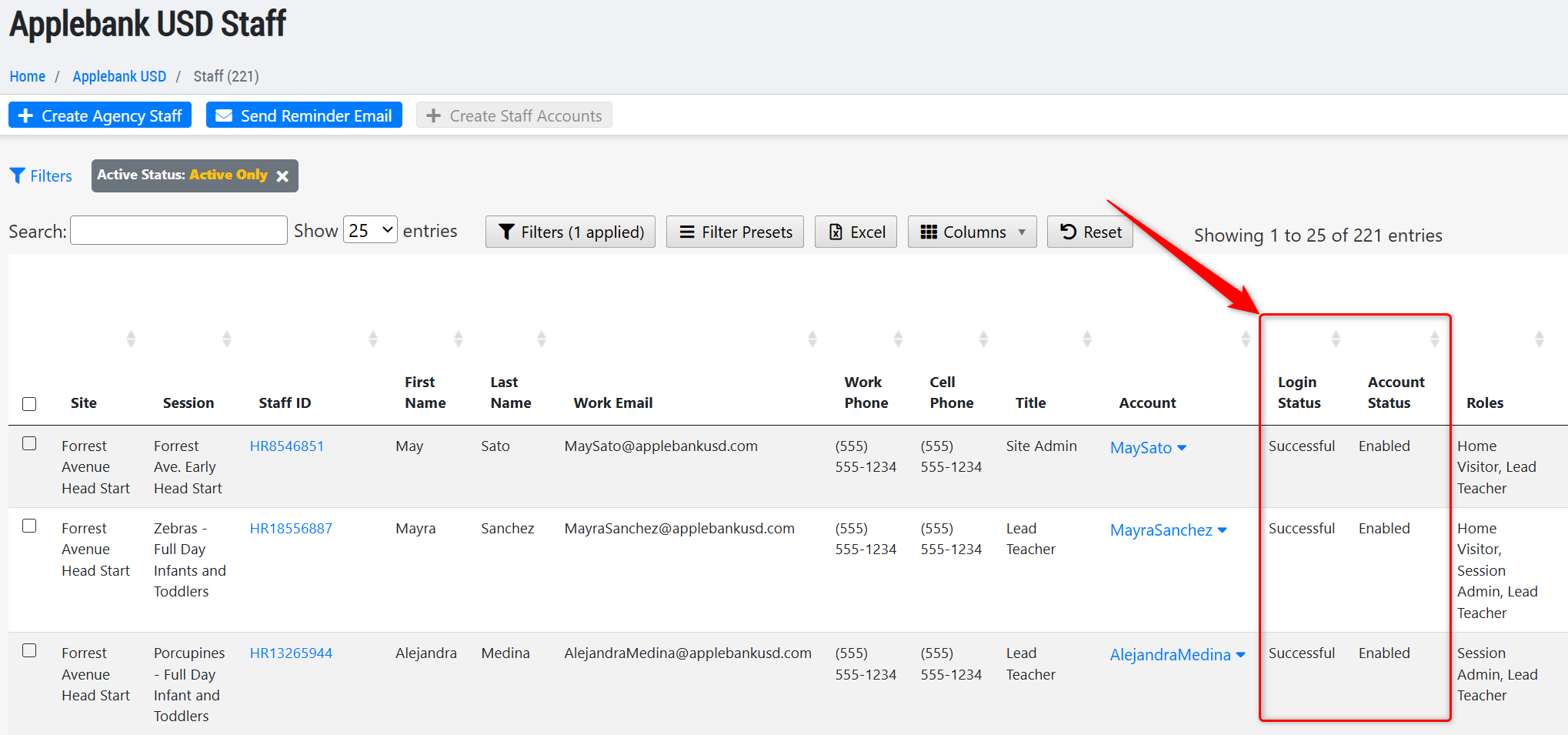
- Added two new columns to the All Staff grid titled "Login Status," which will display the status of the staff's login attempts, and "Account Status," which will display the staff's access to their account. such as enabled or disabled. This may assist with identifying whether staff are locked out of their accounts due to too many incorrect login attempts.
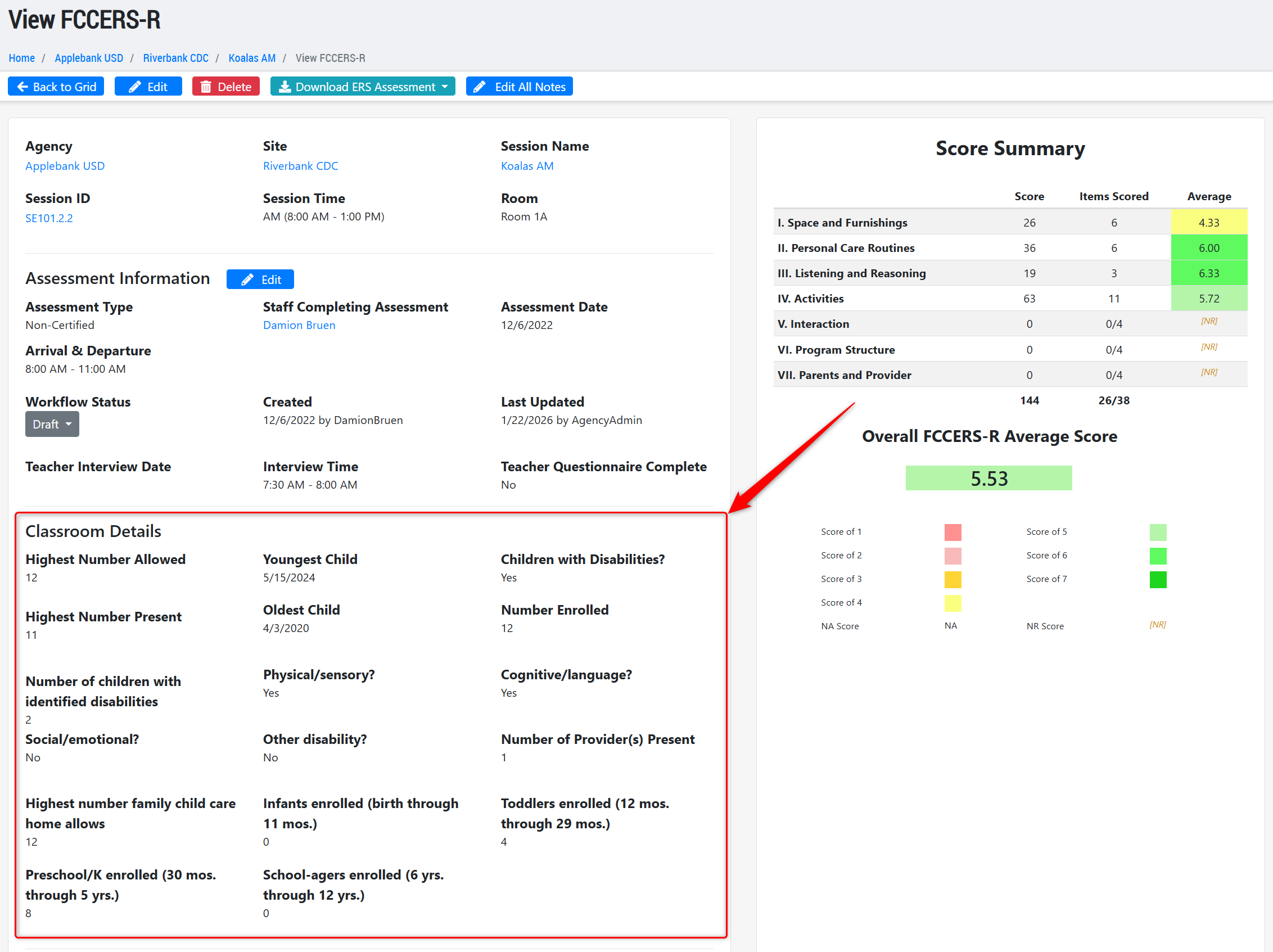
- Updated the FCCERS Assessment record to ensure it supports the newest (revised) version of the ERS Assessment for Family Childcare Homes, including the addition of ten new fields. Any FCCER records created before this update will be preserved, but will now have those ten additional fields to manage.
CAPSDAC 2.0 Report Enhancements
- We have continued to work on the CAPSDAC 2.0 Report in Hubbe to ensure all domains keep up to date with field and validation changes released by the CAPSDAC team. We also continue to fix items discovered by our team and users participating in the Beta testing with the CAPSDAC team. In this latest release, we have also implemented various improvements to optimize the submission process in Hubbe. More about these feature tools will be detailed in later release notes once the Hubbe CAPSDAC 2.0 Report is no longer in Beta testing.
Fixes & Adjustments
- Updated the "Meal Count Summary" report within the Meals and Snacks Data record to ensure any student who is transferred mid-month within the same site will properly report meals served at each session during their service at that session. This was reported by users as an issue with specific configurations of filters applied to the grid.
- Updated the Meal Counts modal at the session level to ensure any child who is signed in during the minute the meal time starts, or who is signed out during the minute the meal time ends, is counted as "served within meal time" status.
- Fixed an issue reported by users within the Meal Counts modal for Adult meal tracking, when it is enabled.
- Updated the eSignature Attendance process to ensure any user attempting to mark attendance for a child on a day that has been "locked" is presented with a descriptive error message of why they are unable to complete the process. When attendance is locked, it means an administrator has prevented users from creating new or changing existing attendance data for past months.
- Fixed an issue with the "Measures Unobserved" count within a child's DRDP-2015 Assessment record, after feedback from users that it was showing negative counts in some cases.
- Fixed an error reported by users when loading into the Average Daily Attendance Report.
- Fixed an issue reported by users when trying to assign users with multiple Home Visitor roles.
- Updated the Cost of Care Plus Rates to apply to December 2025.
- Fixed a SAML SSO issue for Shibboleth
Was this article helpful?
That’s Great!
Thank you for your feedback
Sorry! We couldn't be helpful
Thank you for your feedback
Feedback sent
We appreciate your effort and will try to fix the article